The baseline
First, the thing we're comparing
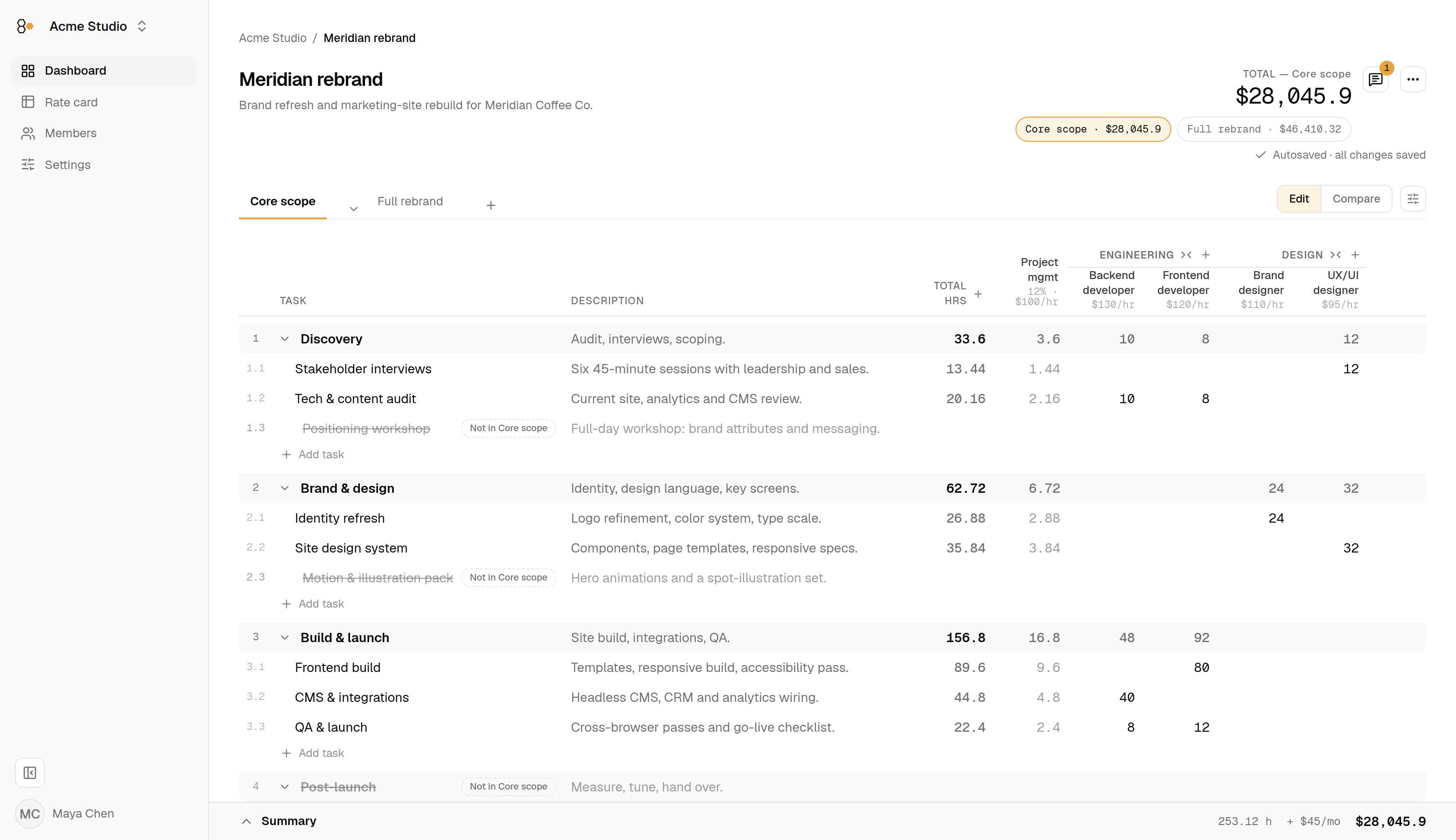
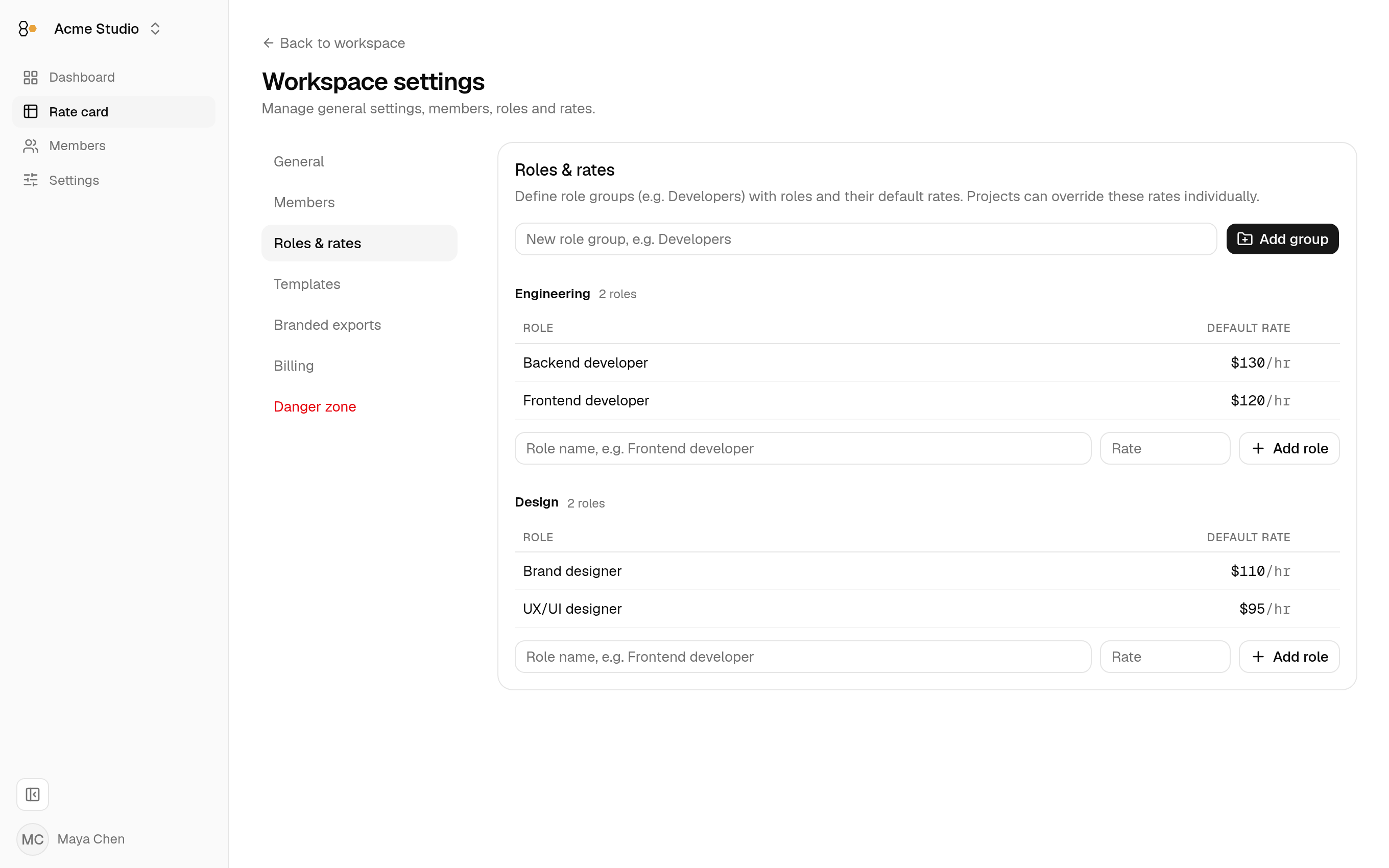
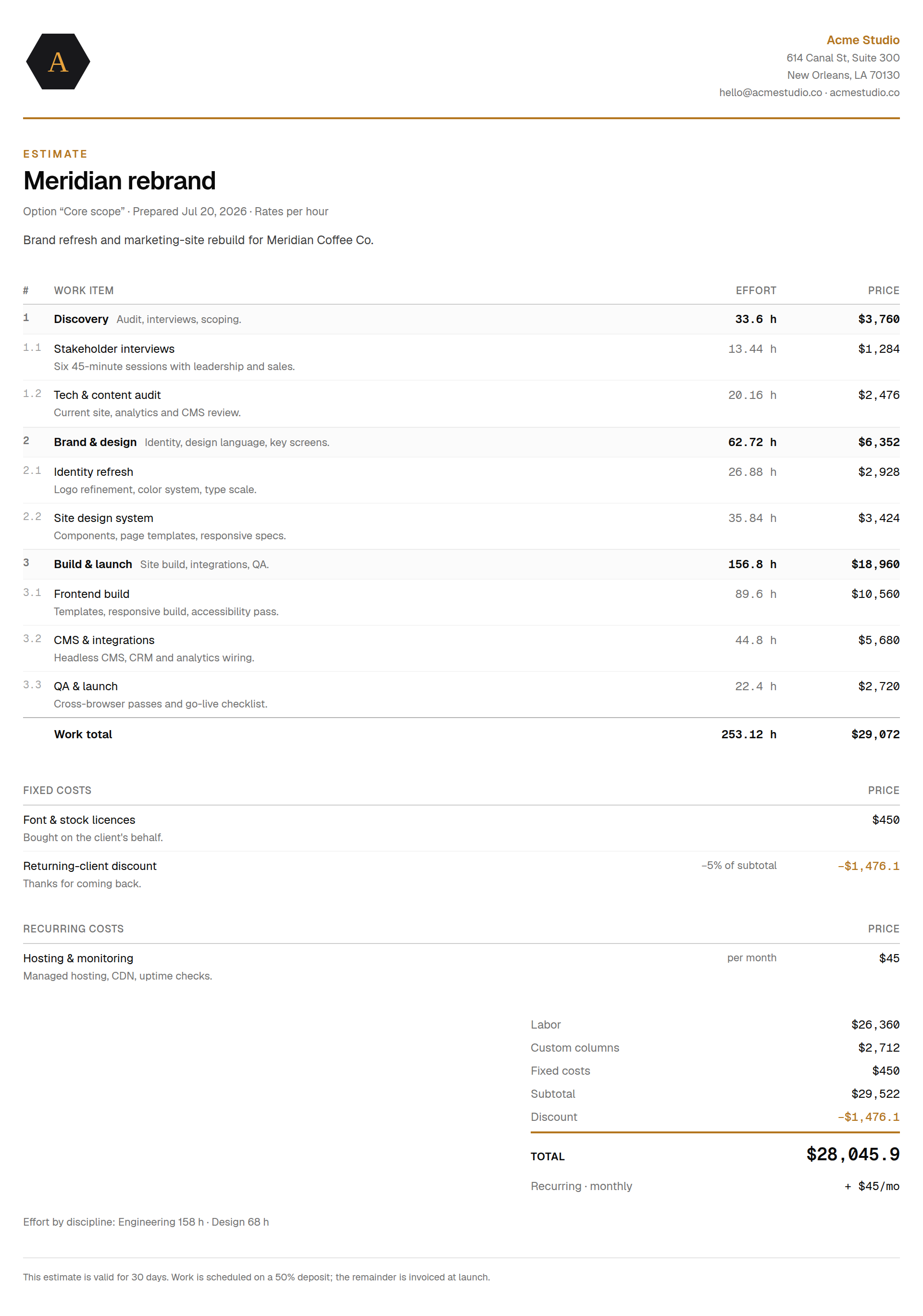
RateHive does one job: project estimates. The estimate is the product — a spreadsheet-like grid of categories, tasks and per-role effort where the math is computed, not maintained: category rows, per-role sums, additional costs, discounts and VAT roll up while you type. Rates aren't typed into the sheet at all; they're configuration. Each workspace keeps a rate card, every estimate resolves against it live, and changing a rate there updates every estimate that hasn't deliberately pinned its own.
The scope is just as deliberate in the other direction: no invoicing, no billing, no time tracking — RateHive is the step before those tools, not a replacement for them. Every section below takes that trade seriously.
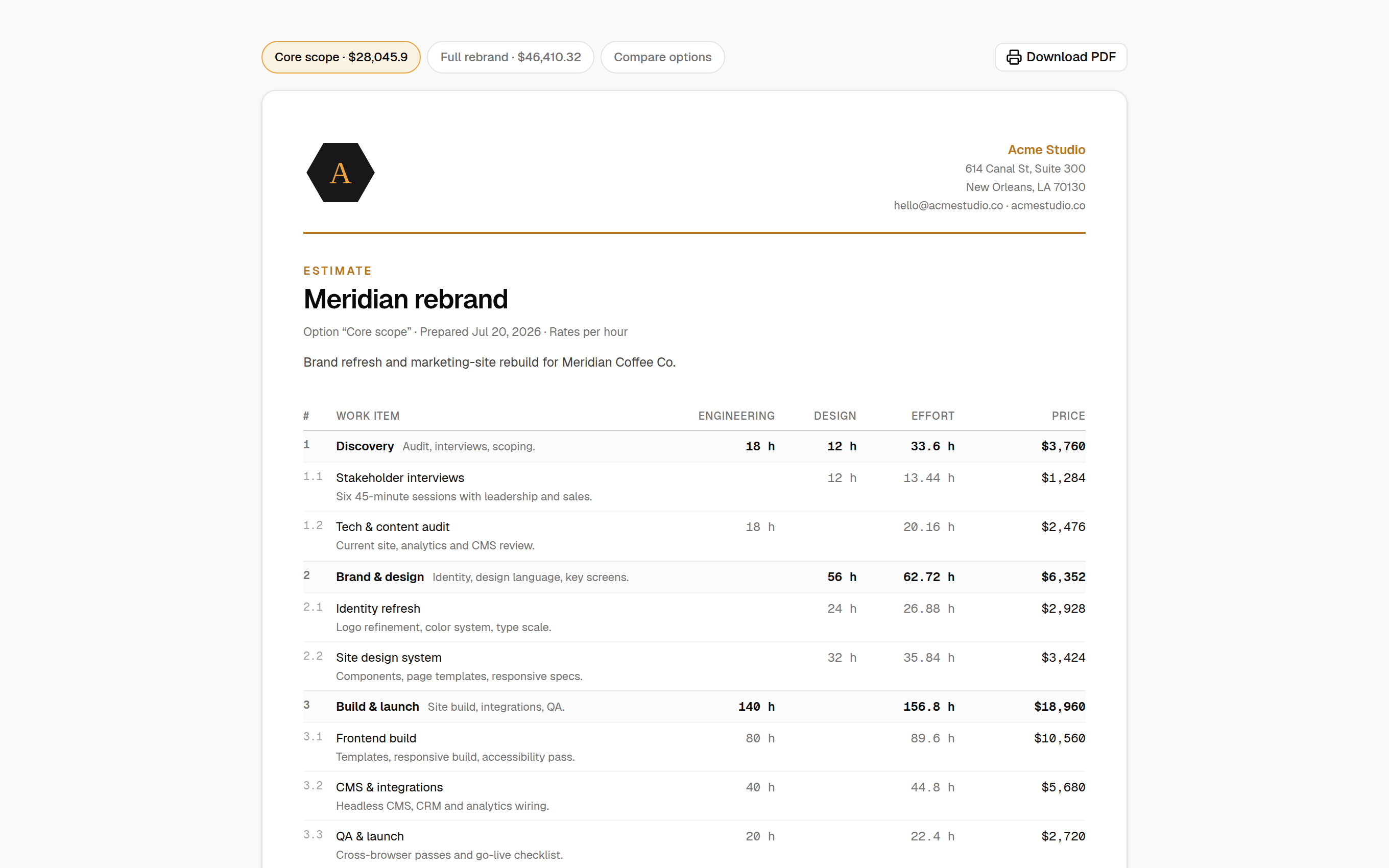
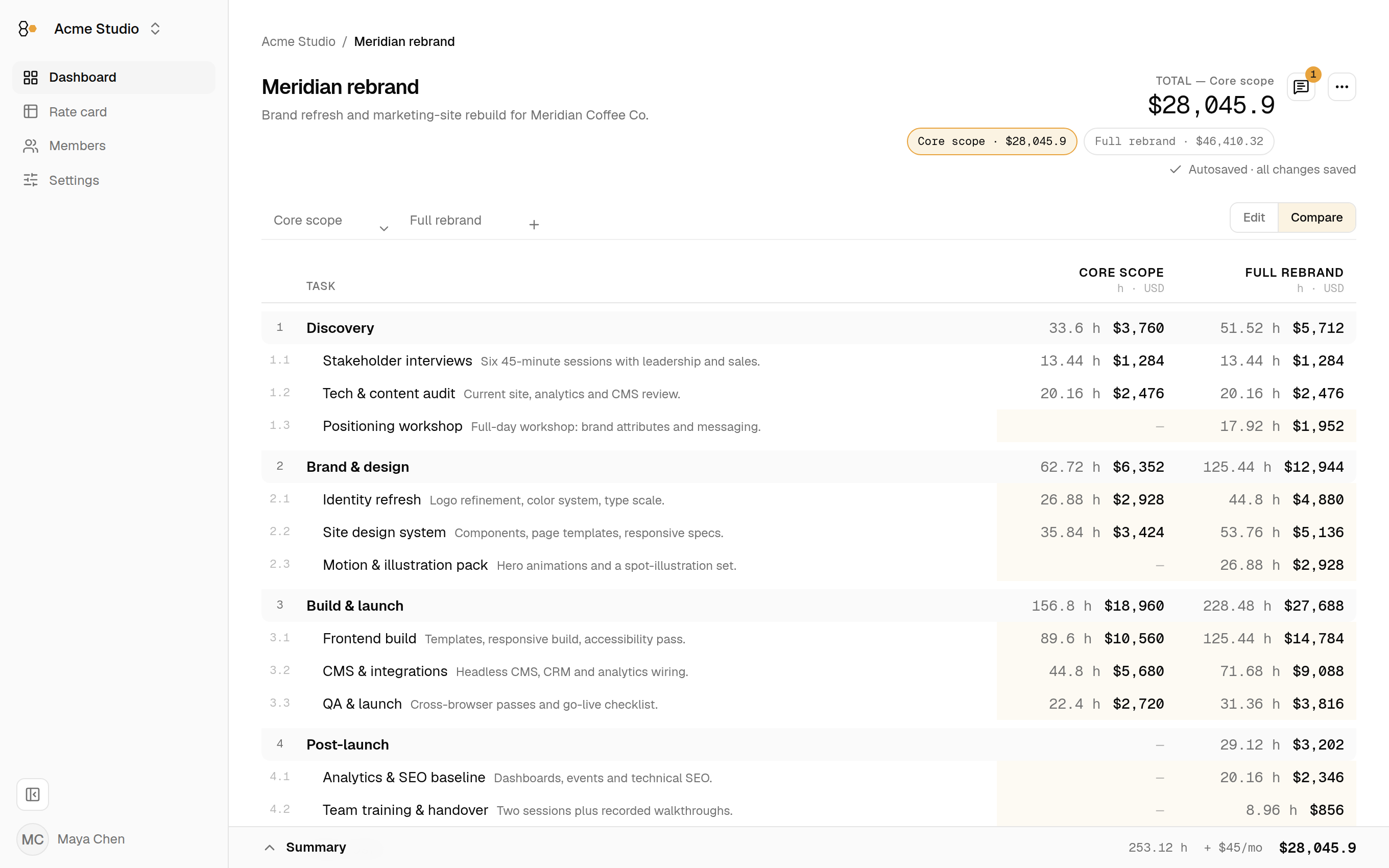
Around that core: parallel variants of an offer (“Core scope” vs. “Full rebrand”) that share one structure, immutable version snapshots, comments on any cell or total, reusable templates, and client-facing output: branded PDF, CSV, email text, or a read-only share link. The Freelancer plan is free with unlimited projects; the Team plan is $14.99/month for the whole workspace — not per seat.
Round one
RateHive vs. spreadsheets
Excel and Google Sheets are the incumbent, and honestly, for good reason: you already pay for them, everyone can open them, and no tool will ever be more flexible. From freelancers to companies with a whole delivery org, most estimating “systems” are a lovingly formatted workbook that has priced every project since 2019.
The failure mode is baked into the workflow: every new quote starts as a copy of the last one. Rates ride along in the copy, so the moment you raise a rate, every older file disagrees with every newer one — and no two quotes match until someone notices. Formula edits break silently (the classic: a row inserted below the SUM range). Offering the client two options means two tabs that diverge the day after you duplicate them. And the client-ready version is its own manual formatting round, every single time.
RateHive pulls the rates out of the file entirely. The estimate stays the document you actually work in; rates become workspace configuration — a rate card every estimate resolves against. A project can deliberately override a role's rate — that's a visible, intentional act, not a stale paste. Structure is computed, so there is no formula to break, and both offers live in one sheet instead of two drifting tabs.
The honest call: if you quote a couple of times a year, alone, and clients take one number — keep the spreadsheet. It's the cheapest tool that works. The switch pays for itself the day a second person edits the file or a client asks “what would the smaller version cost?”
Round two
RateHive vs. proposal software
PandaDoc, Proposify, Better Proposals and friends own the last mile: genuinely polished documents, e-signature, open-and-read analytics, approval workflows. If your bottleneck is getting a signature fast, they are excellent at it — at list prices that in 2026 typically start around $30–40 per user per month.
Here's the gap: in a proposal tool, the price is typed, not modeled. The pricing table is a list of line items you fill in; where those numbers came from is your problem. There's no rate card behind them, no effort×rate math, and “let's offer a lighter option” means duplicating the section and editing both copies — the same drift problem as the spreadsheet, wearing a nicer suit. When scope changes on Thursday night, you re-type.
RateHive is the step before, and it covers enough of the last mile for estimates: a branded PDF, or better, a share link — a read-only, revocable, optionally expiring web view of the live estimate. No attachment archaeology, no “v3_FINAL_final.pdf”.
The honest call: if contracts and signatures are where deals stall, buy the proposal tool — RateHive deliberately has no e-signature. Plenty of studios run both: model the number in RateHive, paste the result into the proposal that gets signed. What you shouldn't do is use a signature tool as a calculator.
Round three
RateHive vs. agency management platforms
Scoro, Productive and the other professional-services platforms are the real thing: quote-to-cash in one system — estimates, resourcing, time tracking, utilization, invoicing, reporting. Some do role-based pricing properly. For an agency of fifteen-plus consolidating its operations, with someone who owns the rollout, they're often the right call.
The cost is the shape of the tool: per-seat pricing across everyone who touches it, onboarding measured in weeks, and estimating as one module among twenty — designed to feed the platform's pipeline, not to be great at pricing. A freelancer or a five-person studio ends up renting a department store to use one counter.
RateHive takes the opposite bet: be the whole product for the one step, and be effortless to adopt. Nothing shows the difference like variants — parallel offers that share one structure, compared side by side with every difference highlighted. That's the kind of depth the estimating step deserves and rarely gets.
The honest call: if you need resourcing, utilization and invoicing unified — and you have the team size and an ops owner to justify it — buy the platform. If what actually hurts is the estimate itself, you can be productive in RateHive this afternoon, and it costs $14.99 a month for the whole workspace.
Round four
RateHive vs. time-tracking and invoicing suites
Harvest, Bonsai and the freelancer suites are built around the money loop: track time, send the invoice, chase the payment, sometimes sign the contract. They're good at it, and if you live alone in that loop, they're plenty.
Their estimates, though, are invoice drafts wearing a different label: flat line items with hand-typed prices. Fine for “Logo package — $4,500”. But the moment a quote is really roles × effort × options — a designer at one rate, two developers at others, a client choosing between scopes — a flat list has nowhere to put the actual thinking, so the thinking happens in a side spreadsheet and gets re-typed. Which is how the drift starts again.
The honest call: if your quotes are one number and your real job is getting paid, the invoice suite is enough — and RateHive won't replace it: we don't do time tracking or invoicing. When the estimate is where you win or lose the project, model it properly and export the result.